Is Myq Free To Use? Everything Beginners Need To Know
Many people want smarter homes. Opening your garage door from your phone feels like the future. MyQ is a popular choice for smart garage door control. But one big question comes up: Is MyQ free to use? The answer is not as simple as yes or no. It depends on how you want to use MyQ and which features you need. This guide will help you understand MyQ’s costs, free features, and where you might pay extra.
What Is Myq?
MyQ is a smart technology platform made by Chamberlain Group. It lets you control your garage door from your smartphone, tablet, or computer. The main idea is convenience and security. With MyQ, you can:
- Open or close your garage door from anywhere
- Get real-time alerts if your garage is left open
- Set schedules for automatic closing
- Share access with family or guests
You need a MyQ-compatible garage door opener or a MyQ Smart Garage Hub, plus the free MyQ app on your device.
Basic Myq Features: What’s Free?
The good news: Many core MyQ features are free. Here’s what you can do without paying extra:
- Remote control: Open and close your garage door using the app
- Notifications: Receive alerts when your door opens or closes
- Scheduling: Set times for your garage to close automatically
- User management: Add or remove people who can control the door
These features cover the needs of most homeowners who just want easy, remote control. You only need to buy the hardware (garage opener or Smart Garage Hub). The MyQ app is free to download on iOS and Android.

Credit: www.reddit.com
Where Myq Starts Charging
While basic features are free, some advanced options need payment. MyQ uses a “freemium” model. Here’s where costs begin:
- Integration with other smart home systems (like Amazon Alexa, Google Assistant, or Apple HomeKit)
- In-garage delivery services (for Amazon Prime packages)
- Video monitoring (if you want to see inside your garage)
Let’s break down each area to see what’s free and what is not.
Smart Home Integrations: Free Vs Paid
Many people buy MyQ to connect their garage with other smart devices. MyQ works with several systems, but not all integrations are free.
| Integration | Free? | Notes |
|---|---|---|
| Amazon Key | Yes | Supports in-garage delivery |
| Google Assistant | No | Subscription required |
| IFTTT | No | Subscription required |
| Apple HomeKit | Free | Hardware may cost more |
| Amazon Alexa | No | Not supported directly |
Key Points For Beginners
- Amazon Key is free to use with MyQ for in-garage delivery.
- Google Assistant and IFTTT need a paid subscription (usually MyQ Premium, $1–$3/month).
- Apple HomeKit support is free, but some MyQ devices do not support it out of the box.
- Amazon Alexa is not officially supported by MyQ. Some third-party workarounds exist, but they are not beginner-friendly.
In-garage Delivery: Is It Free?
Amazon Key In-Garage Delivery lets delivery drivers leave packages inside your garage for more security. Here’s how it works:
- You link your MyQ app with your Amazon Prime account.
- When you order, choose “Key Delivery” at checkout.
- The driver opens your garage for the delivery, then closes it.
There is no extra cost from MyQ for this feature. Amazon Prime members get it as part of their subscription. However, this only works in certain cities and with compatible garage openers.
Myq Video Monitoring: Do You Pay?
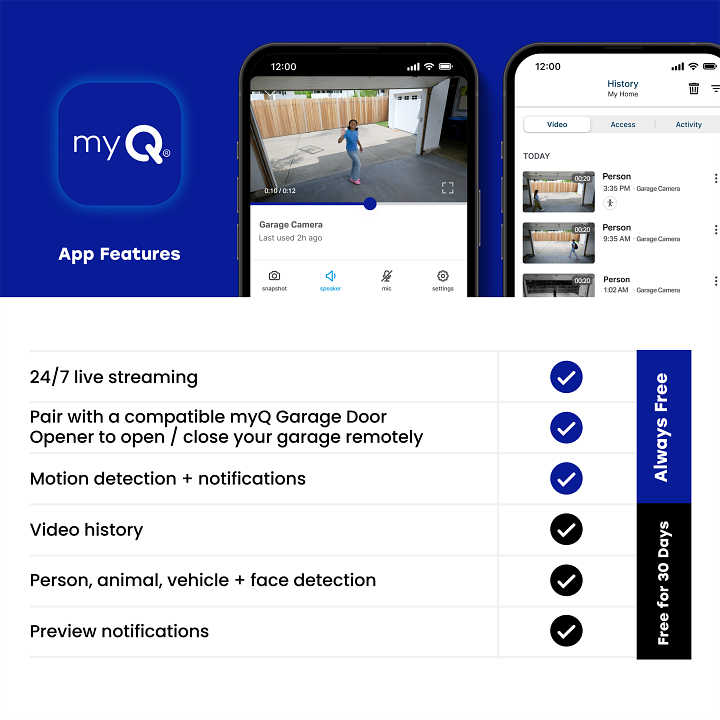
Some MyQ devices support a camera add-on. The MyQ Smart Garage Camera lets you see live video, record clips, and check activity history.
| Feature | Free? | Extra Cost |
|---|---|---|
| Live Video | Yes | None |
| Recording & Playback | No | Subscription: $3.99/month or $39.99/year |
| Motion Alerts | Yes | None |
| Video History (7 days) | No | Subscription required |
- Viewing live video and getting motion alerts are free.
- Saving clips or checking video history costs extra. You need a MyQ Video Storage Subscription.
.jpg)
Credit: www.gatecrafters.com
Myq Hardware: One-time Costs
You can’t use MyQ without the right hardware. Here’s what most people need to buy:
- MyQ Smart Garage Hub: Works with most garage openers. Price: $30–$50.
- MyQ-compatible garage door opener: Some openers have MyQ built-in. Price: $150–$300+ (if you buy a new opener).
- MyQ Smart Garage Camera: Optional. Price: $60–$100.
These are one-time costs. After setup, you can use the free features without paying a monthly fee.
Example: Typical Costs For A Beginner
Imagine you have an old garage door opener. To use MyQ, you buy:
- MyQ Smart Garage Hub: $40
- Installation (DIY): $0
After setup, you use the MyQ app to open/close your garage for free. If you want to connect MyQ to Google Assistant, add $1–$3/month for the subscription.
Myq Premium Subscription: What Do You Get?
Some advanced features need a paid subscription, called MyQ Premium. This is mostly for smart home integrations and automation.
What’s included:
- Google Assistant support
- IFTTT integration (to connect with other smart devices)
- Automated routines (like closing the garage when you leave)
The cost is usually $1–$3 per month, or around $10 per year. Prices change, so check the MyQ app or website for the latest details.
Credit: www.myq.com
Real-world Example: What’s Free Vs What Costs Extra
Let’s look at a practical example. Emily installs a MyQ Smart Garage Hub. Here’s what she gets:
- Free: Open/close garage from her phone, set schedules, get alerts.
- Free: Invite her husband to use the app.
- Free: Link to Amazon for in-garage delivery.
- Costs extra: Link MyQ to her Google Home speaker (needs MyQ Premium).
- Costs extra: Record video of garage deliveries (needs Video Storage Subscription).
This example shows: Basic control is free. Smart home connections or video recording cost extra.
Common Beginner Mistakes With Myq Costs
Many first-time users misunderstand what’s free. Here are common mistakes:
- Thinking all smart integrations are free. Only some are. Check before you buy.
- Assuming Alexa works out of the box. MyQ does not support Alexa directly.
- Missing video recording costs. Live video is free, but saving clips is not.
- Not checking hardware compatibility. Some old garage openers need extra parts.
- Believing there’s a monthly fee for everything. Most MyQ users never pay extra.
Avoid these mistakes by reading MyQ’s details and checking your needs before you spend.
Pros And Cons Of Myq’s Free Features
Let’s compare the main strengths and limits of the free plan.
| Pros | Cons |
|---|---|
| No monthly fee for basic use | Limited smart home integration |
| Easy app control & alerts | No Alexa support |
| Amazon Key delivery is free | Video storage not included |
| Multiple users supported | Some integrations need subscription |
Is Myq Right For You?
Here’s how to decide if MyQ’s free features are enough:
- You want basic control and notifications: Free plan is perfect.
- You need to connect with Google, IFTTT, or record video: Plan for a small monthly fee.
- You’re an Amazon Prime member: In-garage delivery is a good bonus.
- You want Alexa voice control: MyQ is not the best choice.
If you want to keep costs low, stick to the free features. Most homeowners never pay more than the hardware price.
Non-obvious Insights Most Beginners Miss
- Some smart home features are paid, not because of MyQ, but due to third-party agreements. For example, IFTTT charges device makers, so MyQ must pass on the cost.
- You can often find hardware discounts. Many retailers offer sales on the MyQ Smart Garage Hub, so check for deals before buying.
- Not all garage doors are compatible. Always check the MyQ compatibility tool online before you buy.
- MyQ’s app updates can add or remove features. Keep your app updated for the latest options.
How To Get Started With Myq For Free
- Check compatibility: Visit the MyQ website and enter your garage opener model.
- Buy the hardware: Get the MyQ Smart Garage Hub or a compatible opener.
- Download the MyQ app: Free on the Apple App Store or Google Play.
- Install and set up: Follow the app’s step-by-step instructions.
- Use the free features: Remote control, alerts, scheduling.
If you want more, try the free trial for MyQ Premium or Video Storage, then decide if it’s worth the cost.
For more details on MyQ features and compatibility, visit the official MyQ site.
Frequently Asked Questions
Is There A Monthly Fee To Use Myq?
No, you do not need to pay a monthly fee for basic MyQ features. You pay only for the hardware. Advanced features like Google Assistant integration or video storage may need a small subscription.
Can I Use Myq With Amazon Alexa For Free?
No, MyQ does not support Amazon Alexa directly. Some workarounds exist, but they are not official or easy for beginners.
Does Myq Charge For In-garage Amazon Deliveries?
No. In-garage delivery with Amazon Key is free for Prime members. There is no extra charge from MyQ.
Is Live Video Monitoring Free With Myq?
Yes, you can watch live video in the MyQ app for free if you have the camera. But saving video clips or checking old footage needs a paid subscription.
What Happens If I Don’t Pay For A Myq Subscription?
You can still use all the basic features for free: open/close garage, alerts, schedules, and user sharing. Only advanced integrations and video recording features are limited.
Smart home tech can seem confusing at first. With MyQ, most users find the free features are enough for daily life. You only need to pay for extra integrations or recording. Make sure to check your needs before buying, and enjoy a more secure, connected garage.