If your Chamberlain garage door opener is not working properly, or you want to change the remote codes for better security, resetting it can solve many common issues. For beginners, the idea of resetting a garage door opener may feel confusing, but the process is simple if you follow the right steps. This guide will walk you through how to reset your Chamberlain garage door opener safely and easily, using clear instructions, practical tips, and real-life examples.
Many homeowners face problems like unresponsive remotes, doors opening by themselves, or needing to clear all old codes before selling a house. A reset is often the best solution in these situations. You don’t need advanced tools or technical skills.
With just a ladder and a few minutes, you can get your garage door working like new again.
Understanding Why A Reset Is Needed
Before starting, it’s helpful to know why you might need to reset your Chamberlain opener. Here are the most common reasons:
- Lost or stolen remotes: If you lose your remote, someone could access your garage. Resetting erases all old codes.
- New house: When you move into a new home, always reset the opener to remove previous owners’ remotes.
- Malfunctioning system: If your garage door opens randomly or doesn’t respond, a reset can fix software glitches.
- Upgrading devices: Adding new remotes or a wireless keypad often requires a reset for syncing.
Resetting is not the same as just unplugging the device. It wipes all stored remote codes so you can start fresh.
Safety First: What To Do Before Resetting
Safety is important when working with any garage door system. Here’s how to prepare:
- Unplug the opener: If possible, disconnect power to avoid accidental activation.
- Use a sturdy ladder: Most Chamberlain openers are installed on the ceiling.
- Keep remotes handy: You’ll need them to reprogram after the reset.
- Read the manual: Look for your model number and find the user manual for specific instructions.
Tip: If you don’t have the manual, you can find most Chamberlain guides online by searching your model number on the Chamberlain official site.
Step-by-step: How To Reset Your Chamberlain Garage Door Opener
Resetting is a straightforward process, but the exact method can vary slightly by model. Most Chamberlain units use a “Learn” button system.
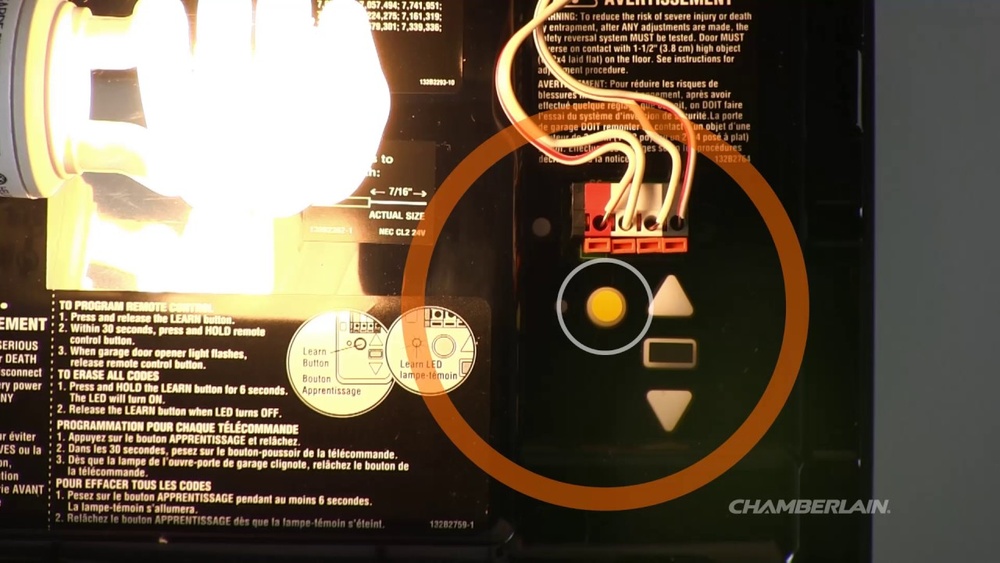
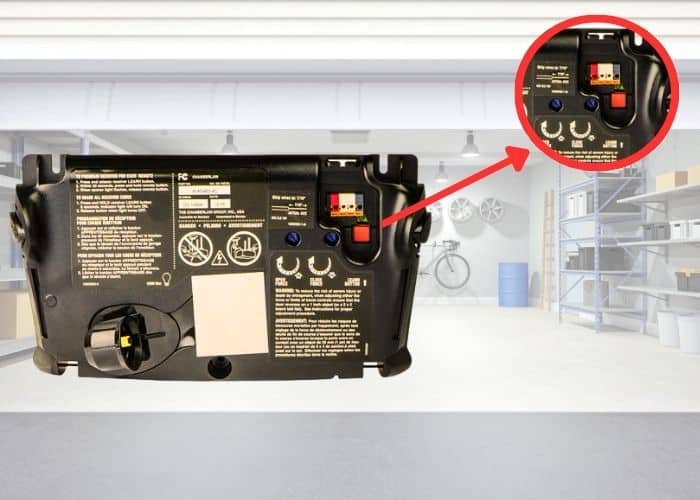
- Locate the Learn Button
- Find the Learn button on the opener’s motor unit. It’s usually on the back or side, sometimes under a light cover.
- The button is often colored yellow, red/orange, or purple.
- Press and Hold the Learn Button
- Using a step ladder, press and hold the Learn button.
- Hold for about 6 to 10 seconds until the LED light next to the button turns off or blinks.
- This action erases all remote controls and keypads from the opener’s memory.
- Release the Button
- Release the Learn button once the light goes out. The opener is now reset.
- Reprogram Remotes and Keypads
- Press and release the Learn button again (don’t hold this time).
- Within 30 seconds, press the main button on your remote control.
- The opener light will blink, or you’ll hear a click, confirming the remote is paired.
- Test Your Remotes
- Try opening and closing the garage door using the remotes to make sure everything works.
Example: If you have two remotes, you need to program each one separately after the reset.
Common Chamberlain Models And Reset Differences
Chamberlain has many models, but most use the Learn button system. However, the button color can affect remote compatibility and programming style. Here’s a quick comparison:
| Learn Button Color | Model Series | Reset Method |
|---|---|---|
| Yellow | MyQ Series (2011+) | Hold Learn 6–10 secs |
| Red/Orange | Security+ (1997-2011) | Hold Learn 6–10 secs |
| Purple | Security+ 2.0 (2005-2014) | Hold Learn 6–10 secs |
| Green | Older Models (1993-1997) | Hold Learn 6–10 secs |
Non-obvious tip: Sometimes, the Learn button is hidden under a light cover. Slide or pop it off gently to avoid breaking the plastic.
Practical Example: Resetting A Chamberlain B550 Model
Let’s walk through an example with the Chamberlain B550, a popular smart garage door opener.
- The Learn button is yellow and located near the wiring terminals.
- Unplug the unit or turn off the breaker for extra safety.
- Press and hold the yellow Learn button for 6–10 seconds. The LED will turn off.
- All old remotes and keypads are now erased.
- To reconnect your remote, press and release the yellow button, then press your remote within 30 seconds.
- Watch for a light flash, which means programming was successful.
Insider insight: If the remote does not pair, check the battery or try moving closer to the motor unit.
Resetting The Keypad
Chamberlain wireless keypads can be reset at the same time as remotes, but sometimes they need an extra step:
- After resetting the opener, press and release the Learn button.
- Enter your desired four-digit PIN on the keypad.
- Press the Enter button within 30 seconds.
- The garage door should move or the opener light will blink, showing the keypad is connected.
Example: If you want a new PIN, you can set it now instead of the old one.
Credit: ottawa-garage-door.com
What To Do If Reset Doesn’t Work
Sometimes, a reset does not fix the problem. Here’s what to check:
- Power supply: Make sure the opener is plugged in and the outlet works.
- Remote batteries: Weak batteries can prevent pairing.
- Antenna wire: Ensure the antenna on the opener is hanging down for best signal.
- Obstructions: Remove any objects blocking the sensors.
- Wiring: Look for loose or damaged wires near the motor unit.
If problems continue, your opener may have a deeper issue. Contact Chamberlain customer support or a local garage door technician.
Resetting Smart Features (myq)
Many newer Chamberlain models have MyQ smart technology for remote control via smartphone. Resetting the opener will not always erase your MyQ account connection. To fully reset MyQ:
- Open the MyQ app and delete the device from your account.
- On the opener, hold the Learn button for 6–10 seconds to reset.
- Re-add the device in the MyQ app if you want to connect again.
Data: Over 4 million Chamberlain MyQ devices are in use in the U.S., so this step is common for smart home users.
Security After Resetting
Resetting your garage door opener is a key step in home security. After a reset:
- Old remotes and codes will not work anymore.
- Only remotes you reprogram will open the door.
- If you lose a remote, thieves cannot use it to enter.
Important: If you sell your house, always reset the opener so the new owner has full security.
Quick Troubleshooting Table
Here’s a helpful reference for common post-reset issues:
| Problem | Possible Cause | Solution |
|---|---|---|
| Remote not working | Batteries dead, not reprogrammed | Replace battery, reprogram remote |
| Keypad won’t pair | Wrong PIN, out of range | Reset PIN, move closer |
| Opener light stays on | Stuck button, wiring issue | Check remotes, inspect wiring |
| Door moves on its own | Old code not erased | Repeat full reset |
Credit: www2.parklanejewelry.com
Maintenance Tips After Reset
Keep your Chamberlain opener working smoothly with these tips:
- Test remotes monthly: Make sure all devices work from outside your garage.
- Keep sensors clean: Wipe dust from safety sensors at the bottom of the door.
- Lubricate moving parts: Use garage door lubricant on hinges and rollers every six months.
- Check for firmware updates: Newer MyQ models may need software updates for security.
Pro insight: Many users forget to test the wall control pad after a reset. Always check it works, too.
When To Call A Professional
Most resets are simple, but call a pro if you notice:
- The door opens or closes halfway and stops
- The motor makes noise but nothing moves
- You see flashing error codes on the opener light
A trained technician can diagnose issues like faulty circuit boards, worn gears, or wiring problems.

Credit: www.youtube.com
Key Differences: Erase Vs. Reprogram
Many beginners confuse erasing all codes (resetting) with simply adding a new remote. Here’s a side-by-side look:
| Erase All Codes (Reset) | Add New Remote (Reprogram) |
|---|---|
| Removes all remotes and keypads | Keeps old remotes working |
| Best if remote lost or for new owner | Best when adding extra remote |
| Use Learn button (hold for 6–10 secs) | Use Learn button (tap, then remote button) |
Beginner mistake: Just tapping the Learn button does not reset the opener. You must hold it until the LED turns off.
Finding More Support
Chamberlain offers support through its official website, live chat, and phone. You can also find step-by-step videos for most models. For more help, visit the Chamberlain Support Center.
Frequently Asked Questions
How Do I Find The Learn Button On My Chamberlain Opener?
The Learn button is usually on the back or side of the garage door motor, often behind a light cover. It’s a small, colored button (yellow, red/orange, purple, or green) next to an LED. Check the manual or search your model online if you can’t find it.
Will Resetting Delete All Remotes And Keypads?
Yes, a full reset erases all paired devices. You’ll need to reprogram each remote and keypad after resetting. Old remotes will not work until reprogrammed, which improves security.
Do I Need Special Tools For Resetting?
No special tools are needed. You may need a ladder to reach the opener, and a screwdriver if the Learn button is behind a cover. Most steps require only your hands.
My Chamberlain Opener Won’t Reset. What Should I Do?
- Check that the opener has power.
- Try holding the Learn button longer (up to 10 seconds).
- Replace the remote’s batteries.
- If it still doesn’t work, call a professional or contact Chamberlain support for help.
Is Resetting Safe For My Garage Door System?
Yes, resetting is safe if done correctly. It clears only the memory for remotes and keypads, not the door settings or motor calibration. Always unplug the opener before working if you’re worried about safety.
Resetting your Chamberlain garage door opener is a quick and effective way to fix most common problems, improve security, and ensure only trusted people have access. With a few simple steps and regular maintenance, your opener will stay reliable for years.