Setting up a garage door opener in your car can make life much easier. No more searching for remotes or getting out in bad weather. With the right steps, you can open and close your garage door by pressing a button in your car.
Many newer cars offer built-in garage door controls, making the process even smoother. But for beginners, the setup can feel confusing. This guide will show you how to connect your car’s system with your garage door opener, avoid common mistakes, and answer frequent questions.
Understanding Garage Door Opener Systems
Before you start, it helps to know what you’re working with. Most cars with built-in openers use a system called HomeLink. Some vehicles may use Car2U or other brands. These systems are designed to copy the signal from your regular garage door remote.
Your garage door opener can use either a fixed code or rolling code. Fixed code means the remote always sends the same signal. Rolling code changes the signal each time for better security. Most openers made after 1996 use rolling code.
Why Does This Matter?
- Rolling code openers need an extra “learn” step for security.
- Fixed code openers are simpler but less secure.
Check your garage opener’s manual or the manufacturer’s website if you’re not sure which type you have.
What You Need Before You Begin
Having everything ready saves you time and frustration. Here’s what you’ll need:
- Your car’s owner’s manual
- The garage door opener’s remote control
- Access to the garage door opener unit (usually in your garage ceiling)
- A ladder (for reaching the opener unit safely)
- Patience—sometimes it takes more than one try
Tip: If your car is parked too far from the opener, move it closer for setup. Signals are weaker from a distance.

Credit: www.wikihow.com
How To Set Up Garage Door Opener In Car: Step-by-step
Let’s walk through the process. The steps may be a little different for your car model, but most follow this pattern.
1. Clear Existing Codes (if Needed)
If your car’s built-in buttons were used before, clear them first:
- Turn the car key to the ON position (do not start the engine).
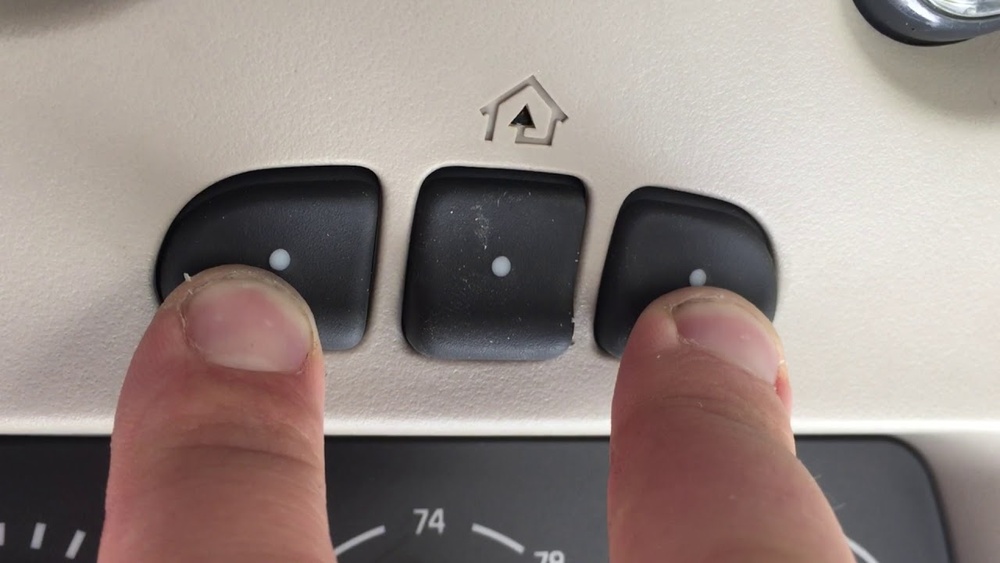
- Press and hold the two outer buttons on the built-in opener panel.
- Keep holding until the indicator light begins to flash rapidly (usually 20 seconds).
- Release both buttons.
This wipes old codes and prevents interference.
2. Choose The Button To Program
Select which button in your car you want to use for the garage door. Usually, you have three options.
- Hold your car’s chosen button and your garage remote together.
- The remote should be about 1-3 inches from the car’s button panel.
3. Program The Button (fixed Code Openers)
For fixed code systems, follow these steps:
- Press and hold your garage remote button and the car’s button at the same time.
- Watch for the car’s indicator light to change from slow to fast blinking.
- When the light flashes rapidly, release both buttons.
- Test by pressing the car button. The door should move.
4. Program The Button (rolling Code Openers)
For rolling code systems, there’s an extra step:
- Do the same as above to “teach” your car the remote’s signal.
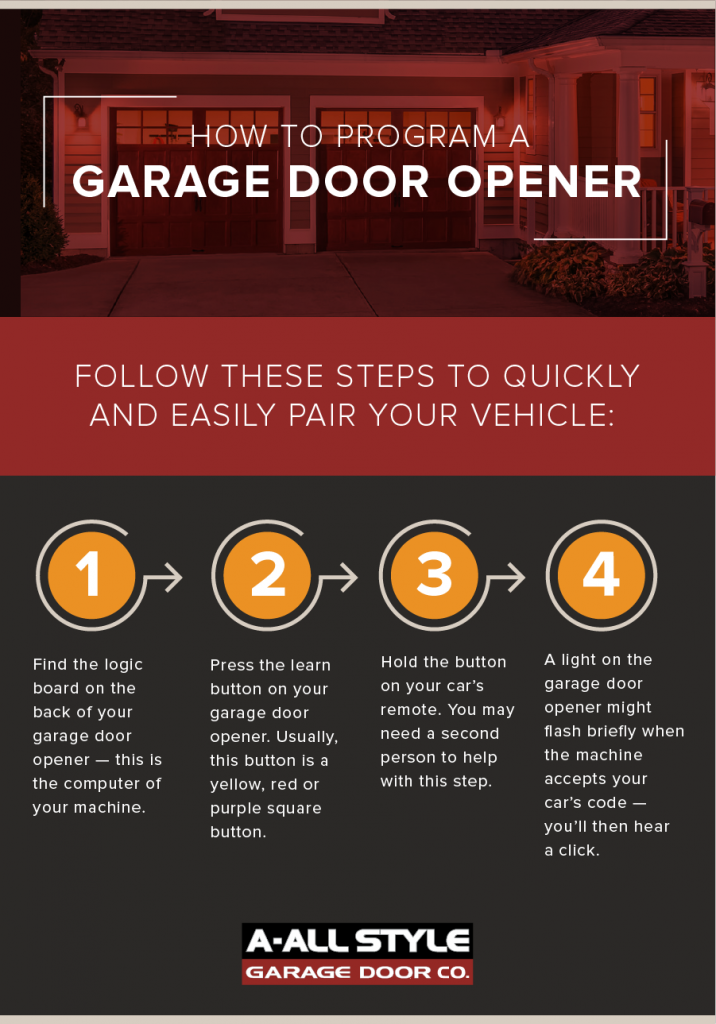
- Now, go to your garage opener unit in the ceiling.
- Find the “Learn” or “Smart” button. It’s usually near a small LED light.
- Press and release the Learn button (don’t hold it).
- You have about 30 seconds to finish.
- Go back to your car and press the programmed button for 2 seconds. Repeat this 2-3 times, until the door moves.
Caution: Do not hold the Learn button too long. It can erase all remotes from the system.
5. Test The Setup
After programming, test the car button several times. The garage door should open and close smoothly.
If it doesn’t work, repeat the steps. Sometimes timing is the problem, especially with rolling code systems.
Example: Setting Up Homelink In A Toyota Camry
Let’s say you drive a 2021 Toyota Camry with HomeLink. Your garage door opener is a Chamberlain with a rolling code.
- Clear codes by holding the two outer HomeLink buttons until the light flashes.
- Hold your garage remote near the HomeLink panel.
- Press and hold the HomeLink button and remote button together.
- Release both when the indicator blinks quickly.
- Climb a ladder and press the Learn button on the Chamberlain unit.
- Within 30 seconds, press and hold the HomeLink button in your car for 2 seconds, three times.
- The garage door should move.
This basic process is similar for Honda, Ford, Chevrolet, and many other brands.
Common Problems And How To Fix Them
Sometimes things don’t work right away. Here are common issues and solutions.
The Door Doesn’t Move After Programming
- Make sure the car is parked close enough to the opener.
- Check the battery in the garage remote—it should be fresh.
- Repeat the rolling code process. Timing matters.
Homelink Light Flashes But Door Doesn’t Move
- Some openers need you to press the car button 2-3 times after pressing the Learn button.
- If you waited too long after pressing Learn, repeat the step.
Car’s System Doesn’t “learn” The Remote
- Hold the remote at different distances (try 1 inch, 3 inches, or even touching the button panel).
- Some remotes use unique signals that may not be compatible. Check your car’s manual or the HomeLink site.
All Remotes Stopped Working
- If the Learn button was held too long, all remotes may be erased. Reprogram them one by one.
Data: Car Brands And Compatibility
Not every car’s built-in system works with every garage door opener. Here’s a quick look at compatibility by car brand and opener type.
| Car Brand | HomeLink Compatible | Rolling Code Support |
|---|---|---|
| Toyota | Yes | Yes (after 1997) |
| Honda | Yes | Yes |
| Ford | Yes | Yes |
| Tesla | Yes (some models) | Yes |
| BMW | Yes | Yes |
| Mazda | Some models | Yes |
Note: Older cars or garage openers may need an adapter or bridge.
Safety Tips
Garage doors can be dangerous if not handled carefully. Keep these safety tips in mind:
- Never let children play with garage door controls.
- Test your door’s safety reversal system monthly. Place a roll of paper towels under the door—if the door doesn’t reverse after hitting it, repair is needed.
- If your garage door opens or closes on its own, reset all remotes and consult a professional.
- Always unplug the opener before doing any electrical work.
Advanced Features And Smart Home Integration
Some new cars and garage door openers support smart home features. You can open or close your garage door with your phone or even voice commands.
Comparing Traditional Vs. Smart Garage Door Openers
| Feature | Traditional Opener | Smart Opener |
|---|---|---|
| Remote Programming | Manual | Manual + App Control |
| Mobile App | No | Yes |
| Voice Control | No | Yes (with Alexa/Google Home) |
| Activity Notifications | No | Yes |
Many people now add a smart garage door controller (like MyQ). These let you check if your door is open, close it from anywhere, and get alerts.

Credit: www.youtube.com
Non-obvious Insights For Beginners
- Some cars need the ignition ON to program the opener, but not started. This small detail is often missed and can block the process.
- If you have fluorescent lights near your opener, they can cause signal interference during programming. Try turning off lights in your garage while setting up.
Practical Tips For Success
- Program your car’s garage opener during the daytime for better visibility.
- Take a photo of your garage opener’s wiring and settings before you start. If you need to reset, you can refer back.
- Read both your car and garage opener manuals. Small details matter, such as how long to press buttons.
How Long Does Setup Take?
Most people finish in 15–30 minutes. If you’re new, give yourself extra time for reading and troubleshooting.
When To Call A Professional
If you’ve tried several times and your garage door still won’t connect, it could be:
- A compatibility issue (older car or opener)
- Broken remote or system
- Wiring issues in the opener unit
A garage door professional can help. They may suggest an adapter, or update your system for modern compatibility.
Credit: www.allstyledoor.com
Additional Resources
For more details or troubleshooting, visit the official HomeLink programming guide.
Frequently Asked Questions
How Do I Know If My Car Has A Built-in Garage Door Opener?
Most cars with built-in openers have three small buttons on the roof, sun visor, or rearview mirror. Check your car’s manual for “HomeLink” or “Universal Garage Door Opener. ” If you see these terms, your car is equipped.
What If My Garage Door Opener Is Too Old To Work With My Car?
If your opener was made before 1993 or doesn’t have rolling code, it may not be compatible. You can buy a HomeLink bridge or smart controller to make it work with new cars.
Can I Program More Than One Garage Door In My Car?
Yes. Most systems support up to three doors. Just repeat the programming steps for each button. Use a different button for each door.
Do I Need To Reprogram My Car If I Replace The Garage Door Opener?
Yes. If you install a new opener or replace the opener unit, you must reprogram your car’s built-in buttons. The old signal will not work with the new unit.
Is It Safe To Program My Garage Door Opener In A Public Place?
It’s better to program your opener in your driveway or garage. This keeps your home more secure and prevents others from copying your signal.
Setting up a garage door opener in your car is a simple way to add comfort and security to your daily routine. With a little patience and the right steps, even beginners can complete the process quickly. Always check your manuals and follow safety tips to avoid problems.
If you run into trouble, don’t hesitate to ask for help—soon you’ll be opening your garage with just a button press.