Programming your garage door opener to your car can make life easier and safer. With a simple press of a button inside your vehicle, you can open or close the garage door without leaving your seat. This feature is especially useful during bad weather or late at night. Many modern cars come with built-in systems like HomeLink or Car2U that can control garage doors and even gates. However, the process can be confusing for beginners. This guide will help you understand every step, avoid common mistakes, and get your garage door opener working with your car quickly.
Why Program A Garage Door Opener To Your Car?
Having your garage door opener linked to your car is more than just a convenience. Here are some reasons to set it up:
- Safety: You don’t need to get out of your car at night or in bad weather.
- Less clutter: No need for extra remotes on your car visor.
- Security: Built-in systems are harder for thieves to copy than old remotes.
- Simplicity: One button in your car can control many doors or gates.
Basic Concepts: How The System Works
Most cars use a universal transmitter system. The main types are:
- HomeLink: Found in many vehicles, it works with most garage door brands.
- Car2U: Another system, mainly in Ford and General Motors cars.
These systems learn the signal from your garage remote and send it directly to the garage door opener. Some openers use “rolling code” technology for security, which means the code changes every time you press the button.
Here’s how the process works:
- The car’s system gets the code from your old remote.
- It saves the code in the car’s memory.
- The car sends the code to the garage opener when you press the button.

Credit: www.youtube.com
What You Need Before Starting
To program your garage door opener to your car, you need:
- Your car’s manual (for specific instructions)
- The original garage door remote (with working battery)
- Access to your garage door opener (the device on your garage ceiling)
- A ladder (if your opener is out of reach)
- Another person (helpful but not required)
It’s best to park your car outside the garage during setup. This prevents the door from closing on you by mistake.
Step-by-step Guide: Programming The Opener
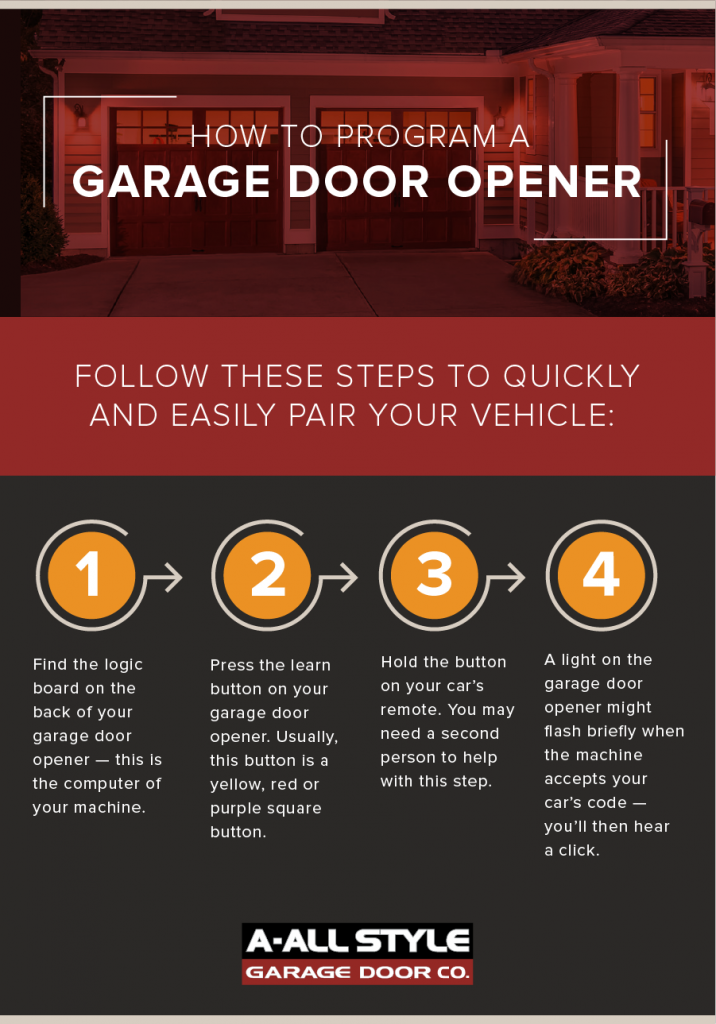
Let’s break down the process into simple steps. The details can change by car and garage opener, but most follow a similar pattern.
Step 1: Clear Old Codes (if Needed)
Some cars store old codes from previous owners. To avoid problems:
- Hold the two outside buttons on your car’s system for about 10 seconds.
- Wait for a blinking light, then release. This erases old codes.
Step 2: Train The Car With Your Remote
- Hold your garage remote close to your car’s built-in buttons.
- Press and hold both the car button you want to program and the remote button at the same time.
- Watch for a flashing light on the car’s system. It may take up to 30 seconds.
- When the light changes (steady or quick blink), release both buttons.
Step 3: Link To The Garage Door Opener (if Rolling Code)
If your garage uses rolling code (built after 1996), one more step is needed:
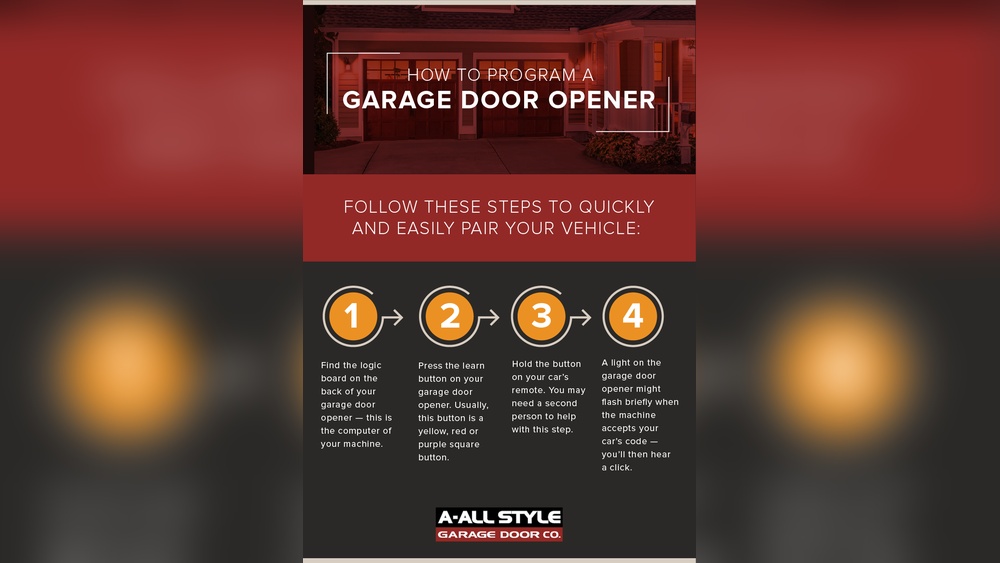
- Find the “Learn” or “Smart” button on your garage door opener unit (usually under a light cover).
- Press the “Learn” button. You’ll see an LED light up for about 30 seconds.
- Return to your car and press the programmed button 2-3 times (holding each for 2 seconds).
- The garage door should move, showing it’s programmed.
Step 4: Test The System
- Sit in your car and press the programmed button.
- The door should open or close.
- If not, repeat the steps or check your car and opener manuals for extra steps.
Example: Programming A Homelink System
Let’s look at an example with a Toyota Camry and a LiftMaster garage opener:
- Park the Camry outside the garage.
- Hold the first and third HomeLink buttons for 10 seconds to clear codes.
- Hold the garage remote near the HomeLink buttons.
- Press and hold both the remote button and the HomeLink button you want to program.
- Wait for the HomeLink light to blink quickly, then release both.
- On the LiftMaster opener, press the “Learn” button.
- Within 30 seconds, press and hold the HomeLink button for 2 seconds, release, and repeat.
- The garage door should now respond.
Differences Between Homelink And Car2u
Not all cars use the same system. Here’s a quick comparison:
| System | Car Brands | Garage Opener Compatibility | Number of Buttons |
|---|---|---|---|
| HomeLink | Toyota, Honda, Mercedes, Ford, more | Most brands, including rolling code | 3 |
| Car2U | Ford, Lincoln, Mercury, GM | Many brands, but not all rolling codes | 3 |
Tip: Always check your car manual to see which system you have.
Credit: www.allstyledoor.com
Common Problems And Solutions
Programming doesn’t always work the first time. Here are solutions to frequent issues:
- Remote not working: Check the battery or try a different remote.
- No blinking light in car: Make sure you are holding both buttons long enough.
- Garage door not responding: Try pressing the car button several times, or re-do the “Learn” step.
- Opener too old (before 1993): Some cars can’t program to very old openers. You may need an adapter.
- Rolling code confusion: Make sure you press the car button within 30 seconds of the garage “Learn” button.
Safety Tips During Programming
Never stand under the garage door while testing. It could close suddenly.
If you have small children or pets, keep them away during setup.
Always park the car outside the garage. This gives you space and avoids accidents.
When You Need Extra Help
Sometimes, even after following all steps, the system won’t program. Here’s when to get help:
- The “Learn” light won’t come on: Your opener may be broken.
- Your car is not listed as compatible: Some old or rare garage openers don’t work with built-in car systems.
- You’ve lost your garage remote: Many systems need the original remote to program the car.
In these cases, check the car manual, the garage door opener manual, or call a professional installer.
You can also check the official HomeLink programming website for detailed guides and compatibility charts.
Data: Compatibility And Success Rates
How likely is it that your car and garage door will work together? Here are some numbers:
- About 90% of cars with HomeLink can program to openers made after 1996.
- Older garage door openers (before 1993) have only a 50% chance of working with new cars.
- Up to 70% of user problems come from weak remote batteries or skipping the “Learn” step.
Here’s a quick look at compatibility:
| Opener Year | Works with HomeLink | Works with Car2U |
|---|---|---|
| Before 1993 | Rarely | No |
| 1993-1996 | Sometimes | Sometimes |
| After 1996 | Yes | Yes |

Credit: www.youtube.com
Advanced Tips: Multi-door And Gate Control
Modern car systems can control more than one door or gate.
- Each button in your car can be programmed for a different garage or gate.
- Some systems allow up to three separate devices.
- If you move or get a new car, remember to erase the old codes for safety.
Non-obvious insight: If your garage is in an apartment or condo, you may need permission from the building manager before programming.
Example: Programming Multiple Doors
Suppose you have a two-car garage with separate openers:
- Use Button 1 for the left door, repeat the programming steps with the left opener and remote.
- Use Button 2 for the right door, repeat with the right opener and remote.
- Now, Button 1 opens the left door, and Button 2 opens the right.
If you also want to open a community gate, program Button 3 with the gate’s remote and follow the same steps.
What If My Car Doesn’t Have Homelink Or Car2u?
Some older or entry-level cars don’t include a built-in garage door system. But you still have options:
- Use the original remote and keep it in your car.
- Buy a universal remote (about $20-$50) that can learn your garage code.
- Install an aftermarket HomeLink system (usually fits in the sun visor).
Here’s a quick comparison:
| Option | Cost | Ease of Install | Features |
|---|---|---|---|
| Original Remote | Free (if you have one) | Easy | One device only |
| Universal Remote | $20-$50 | Easy | 2-3 devices |
| Aftermarket HomeLink | $100-$250 | Medium | Multiple devices, built-in look |
Security And Privacy Considerations
Programming your car to your garage opener adds convenience, but don’t forget about security:
- Always clear the car’s codes when selling or trading your vehicle.
- Don’t leave written codes or instructions in the car.
- Use a rolling code opener for best security.
- If your garage door opens by itself, reprogram all remotes and the car.
Non-obvious insight: If you lose your garage remote, reprogram both the car and all remotes. This prevents others from using the lost remote to enter.
Frequently Asked Questions
Can All Cars Program To Any Garage Door Opener?
Not always. Most cars with HomeLink or Car2U work with garage openers made after 1996. Very old openers (before 1993) may not be compatible.
What If My Garage Door Uses Dip Switches Instead Of Rolling Code?
If your opener uses dip switches (small switches inside the remote), you can usually program your car, but some modern systems may need an adapter.
How Do I Know If My Garage Opener Uses Rolling Code?
Look for a “Learn” or “Smart” button on the opener. If it has one, it’s likely rolling code. Also, check the opener manual or the HomeLink website for details.
Can I Program More Than One Garage Door Or Gate To My Car?
Yes. Most systems have three buttons, letting you control up to three doors or gates. Just repeat the programming steps with each device.
What Should I Do If The Process Still Doesn’t Work?
Check the remote battery, make sure you’re following the steps exactly, and look at both car and opener manuals. If it still fails, call a professional or visit the HomeLink programming site for more help.
Programming your garage door opener to your car may seem complex at first, but with clear steps and a bit of patience, you can enjoy easy, secure access to your garage every day. By following this guide, you’ll save time, reduce stress, and make your daily routine smoother.