Programming a garage door opener in your car makes everyday life easier. But what if you lost or broke your remote? Many drivers think they need the remote to set up their car’s built-in garage door buttons. The truth is, you can often program your garage door opener in your car without a remote. You just need the right steps, a little patience, and an understanding of how your garage system works.
This guide will show you how to do it, even if you’re a complete beginner. You’ll learn what tools you need, how to find the right buttons, and how to avoid common mistakes. I’ll also share tips from real-world experiences and answer the most frequent questions.
By the end, you’ll feel confident to program your opener without extra help.
Understanding Garage Door Opener Systems
Before you start, it’s helpful to know the basics. Most modern cars have a built-in system called HomeLink or a similar feature. This lets you connect your vehicle to your garage door opener. Your garage door opener in the garage is the device with a motor and a “learn” or “smart” button.
Some older cars may use a different system, but the general process is similar. The main things you need:
- Your car with built-in garage door buttons (usually on the visor, ceiling, or dashboard)
- Access to the garage door opener motor unit (usually in the garage ceiling)
- A ladder to reach the unit safely
Not all garage openers work the same. Brands like LiftMaster, Chamberlain, and Genie are common. Some very old openers (pre-1993) may not support car programming without a remote. If your opener is newer, you’re likely in luck.
Key Differences: Fixed Code Vs Rolling Code
Garage openers use either fixed code or rolling code technology.
- Fixed code: Uses the same code every time. Usually found in openers made before 1996.
- Rolling code: Changes the code each time you use it. More secure. Found in most openers after 1996.
Why does this matter? Rolling code openers require an extra “learn” step at the opener motor. Fixed code openers sometimes let you program directly from the car.
When You Don’t Have The Remote
Losing the remote isn’t the end of the world. Here’s what you need to check first:
- Car compatibility: Look for HomeLink or Car2U system buttons in your car. Most cars made after 2005 have these.
- Opener compatibility: Check your garage opener manual or model number. Most units after 1996 support HomeLink programming.
If you’re unsure, you can usually find the opener model on a label. Search for “HomeLink compatibility” with your model if needed.
Important note: If you rent or share your garage, get permission before resetting or programming new openers. This process can erase other users’ remotes.
Step-by-step: Programming Without A Remote
Let’s break down the process into clear steps. These instructions fit most HomeLink-equipped vehicles and rolling code garage openers from the last 25 years.
1. Clear Existing Car Garage Button Memory
Before you program, clear any old codes from your car’s system.
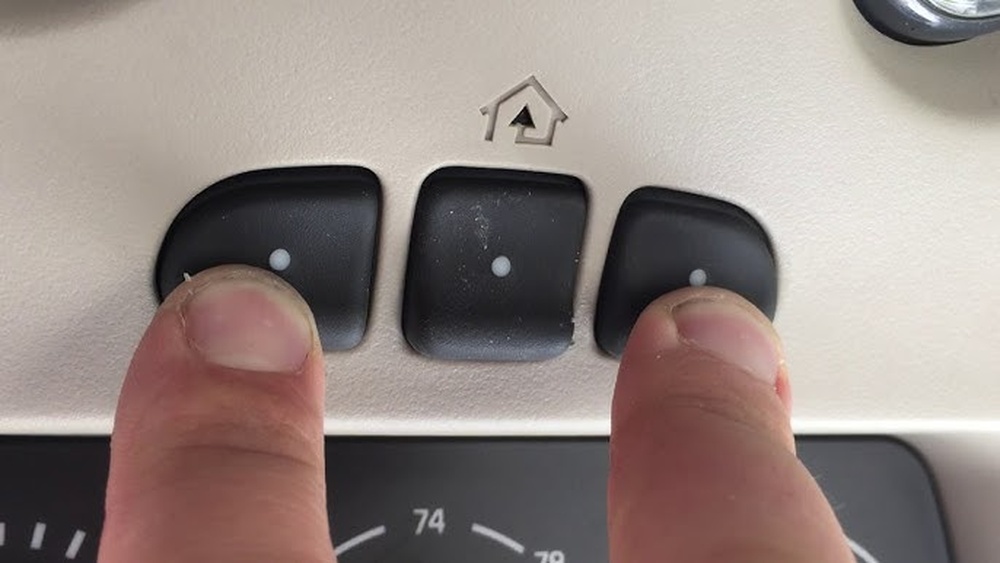
- Hold the two outer garage buttons on your car’s system (not the middle one) for about 10-20 seconds.
- The indicator light will start to blink or flash rapidly.
- Release the buttons. The system is now reset.
This step prevents old signals from interfering.
2. Locate The “learn” Button On The Garage Opener
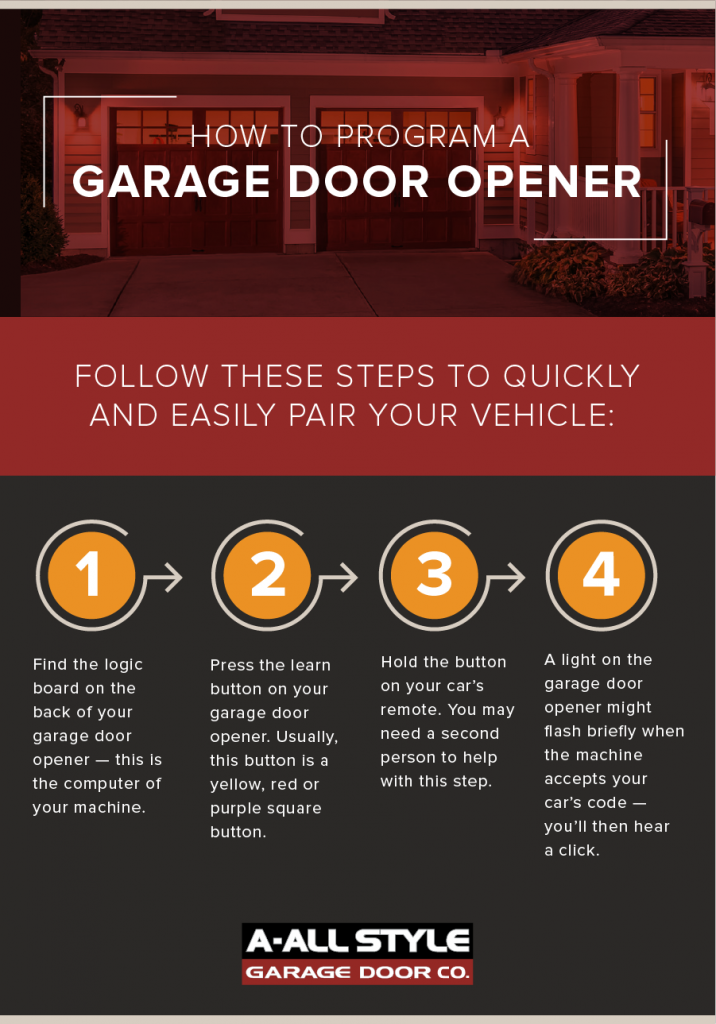
Every rolling code opener has a “learn” button. You’ll find it on the opener motor, usually:
- Under a plastic light cover
- On the back or side of the unit
The button color can be yellow, red, purple, or green, depending on the brand. If you can’t find it, check your opener’s manual.
3. Prepare Your Car’s Garage Button
- Sit in your car, park near the garage.
- Turn the ignition to the “on” position, but don’t start the engine.
- Choose which built-in button you want to program.
4. Press The “learn” Button On The Opener
- Climb the ladder safely.
- Press the “learn” button on the garage opener. You’ll see a small LED light turn on or blink.
- You have about 30 seconds to program your car.
5. Program The Car Button
- Go back to your car quickly.
- Press and hold the chosen garage button in your car for 2 seconds, then release.
- Repeat: Press and hold again for 2 seconds, then release.
- Do this up to 3 times or until the garage door moves (opens or closes).
Some cars use a different timing (one long press or several short presses). If nothing happens, try holding the button for up to 20 seconds.
6. Test The System
- Wait a few seconds.
- Press the car’s garage button once more.
- The garage door should move. If not, repeat the steps carefully.
7. Re-program Or Add More Cars (if Needed)
If you have more cars, repeat these steps for each one. Some openers allow several vehicles, but there’s usually a limit (often 5).
Extra Tip: If your opener’s memory is full, you may need to erase all devices and start over. Check your opener’s manual for how to do this.
Example: Programming A 2017 Toyota Camry With Chamberlain Opener
Let’s put the steps into context:
- The Camry has HomeLink buttons on the ceiling.
- Chamberlain opener has a yellow “learn” button.
- The owner lost the remote.
Steps:
- Reset HomeLink by holding the two outer buttons for 20 seconds.
- Climb a ladder, press the yellow “learn” button on the Chamberlain opener.
- Within 30 seconds, get in the Camry, press and hold the chosen HomeLink button for 2 seconds, release, repeat.
- After the third press, the garage door moves.
- Test by pressing the button again.
This process works for most modern cars and openers.

Credit: www.reddit.com
Comparison: Remote Vs Programming Without Remote
To help you see the key differences, here’s a comparison:
| Method | Tools Needed | Difficulty | Time Required | Security |
|---|---|---|---|---|
| With Remote | Remote, Car, Opener | Easy | 5-10 minutes | High |
| Without Remote | Car, Opener (no remote) | Moderate | 10-20 minutes | High |
Programming without a remote is a bit more work, but very doable for most people.
Troubleshooting: Common Problems And Fixes
Sometimes things don’t go as planned. Here are the most common issues and how to solve them:
- Garage door doesn’t respond: Double-check you pressed the “learn” button and programmed the car within 30 seconds.
- Car’s indicator light doesn’t blink: Make sure you’re holding the car button long enough. Reset the system and try again.
- Garage opener memory full: You may need to erase all devices from the opener (see the manual).
- Wrong button on car: Try programming a different car button.
- Opener too old: Some pre-1993 models don’t support this method.
If you still have problems, check your car and opener manuals, or visit the HomeLink official programming site for step-by-step instructions.
Credit: www.allstyledoor.com
Safety Precautions
Working with garage door openers means you need to be safe:
- Always use a sturdy ladder to reach the opener.
- Don’t let children play with the garage buttons.
- If your garage door moves unexpectedly, step clear right away.
- Don’t hold the car’s garage button down for too long (no more than 20 seconds at a time).
A little caution goes a long way.
Table: Major Garage Door Opener Brands And “learn” Button Locations
Here’s where you’ll usually find the “learn” button by brand:
| Brand | Common Button Color | Typical Location |
|---|---|---|
| Chamberlain/LiftMaster | Yellow, Purple, Red/Orange, Green | Back or side of motor unit, under light cover |
| Genie | Red, Black | Under light lens, near wiring terminals |
| Craftsman | Purple, Red, Orange | Back panel, sometimes under cover |
| Overhead Door | Red, Purple | Back panel |
| Marantec | Red | Side or back, under cover |
If you can’t find your brand, check the opener’s manual or website.
Practical Tips For Success
Programming can seem tricky, but these tips make it easier:
- Have a helper press the car button while you press the “learn” button (saves time).
- If you make a mistake, just start over from the memory reset step.
- Use your phone to take a picture of the opener’s “learn” button for reference.
- Write down which car button controls which door (if you have multiple garages).
- Test the system several times to be sure it works.
Data: How Many Cars Can Be Programmed?
Most garage openers allow 5 to 8 devices (remotes or cars) to be connected. Here’s a quick look:
| Brand | Max Devices |
|---|---|
| Chamberlain/LiftMaster | 5 |
| Genie | 7 |
| Craftsman | 5 |
| Overhead Door | 7 |
| Marantec | 8 |
If you reach the limit, you’ll need to clear the opener’s memory before adding a new car.

Credit: www.youtube.com
Non-obvious Insights Most Beginners Miss
- “Learn” button timing is critical: Most failures happen because people wait too long between pressing the “learn” button and the car button. Always move quickly.
- Not all buttons are programmable: Some car garage buttons can only control certain frequencies or brands. If one button won’t work, try another.
- Professional installers can help: If you have a complicated system or several failed attempts, sometimes a local garage door pro can program your system in just a few minutes for a small fee.
- Updating car software: Some cars may need a software update to work with newer openers. Check with your dealer if you have a very new opener and an older car.
Frequently Asked Questions
Can I Program My Garage Door Opener In My Car If I Don’t Have A Remote?
Yes, as long as your car has a built-in garage button system (like HomeLink) and your garage opener has a “learn” button. Most modern openers and cars support this method.
What If My Garage Opener Is Too Old?
Openers made before 1993 often lack a “learn” button and rolling code technology. In this case, you may need to buy a new opener or a universal remote for compatibility.
Is It Safe To Program My Car Without A Remote?
Yes, it’s safe if you follow the steps carefully and use a ladder properly. Always keep children and pets away during the process.
How Many Cars Can I Connect To My Garage Door Opener?
Most openers support 5 to 8 devices (cars or remotes). If you need more, check your opener’s manual or website for details.
Where Can I Find More Help?
Check your car’s manual, the opener’s manual, or visit the HomeLink Wikipedia page for more details.
Programming your garage door opener in your car without a remote may sound hard, but with these steps, you can do it yourself in less than 20 minutes. Take your time, stay safe, and enjoy the convenience of opening your garage from the car—no remote needed.