Reprogram Liftmaster Keypad
A Liftmaster keypad makes entering your garage easy. You do not need to carry a remote or a key. But sometimes, you may need to change your code. Maybe you forgot your old code, just moved in, or want better security. Reprogramming your Liftmaster keypad is easier than you might think—even if you are a beginner.
This guide will show you how to reprogram your keypad step by step. You will also learn about common problems, tips, and how to keep your garage secure. Let’s make sure your garage is safe and easy to use.
Why Reprogram Your Liftmaster Keypad?
Many people wonder why it is important to reprogram their Liftmaster keypad. Here are key reasons:
- Security: If someone else knows your code, they can get into your garage. Change your code if you move into a new home or lose a remote.
- Forgotten Code: It is easy to forget old codes. Reprogramming lets you set a new one.
- Multiple Users: Families or renters may need their own code.
- Malfunction: Sometimes the keypad stops working with the old code.
Reprogramming is fast. It usually takes less than 10 minutes and does not require special tools.
Understanding Your Liftmaster Keypad
Liftmaster keypads come in different models. Most keypads look similar and work the same way. They are usually found next to your garage door. Here’s what you need to know:
- Keypad: Where you enter your code.
- Learn Button: Found on the opener motor inside the garage.
- Indicator Light: Shows if programming is successful.
Common Models
- 877MAX
- 878MAX
- 387LM (universal)
Knowing your model helps you find the right instructions. You can check the back of the keypad or the manual.
Learn Button Colors
The Learn button on the motor unit is important. It tells you which programming method to use. The color also helps you know the opener’s age.
| Learn Button Color | Year | Notes |
|---|---|---|
| Yellow | 2011–present | Security+ 2.0 |
| Purple | 2005–2011 | Security+ |
| Red/Orange | 1997–2005 | Security+ |
| Green | 1993–1996 | Original Security+ |
Find the Learn button by removing the light cover on your opener.

Credit: firstlinegarage.com
Step-by-step: How To Reprogram Liftmaster Keypad
The process is simple but may be different depending on your model. Here is a beginner-friendly way to reprogram most Liftmaster keypads.
1. Clear Old Keypad Code
Some people skip this step, but it’s safer to clear old codes first.
- Go to your garage door opener unit (the box on the ceiling).
- Press and hold the Learn button for about 6 seconds.
- The indicator light will go out. All remotes and keypads are now erased.
Tip: If you only want to change the keypad code (not remotes), skip this step.
2. Enter Programming Mode
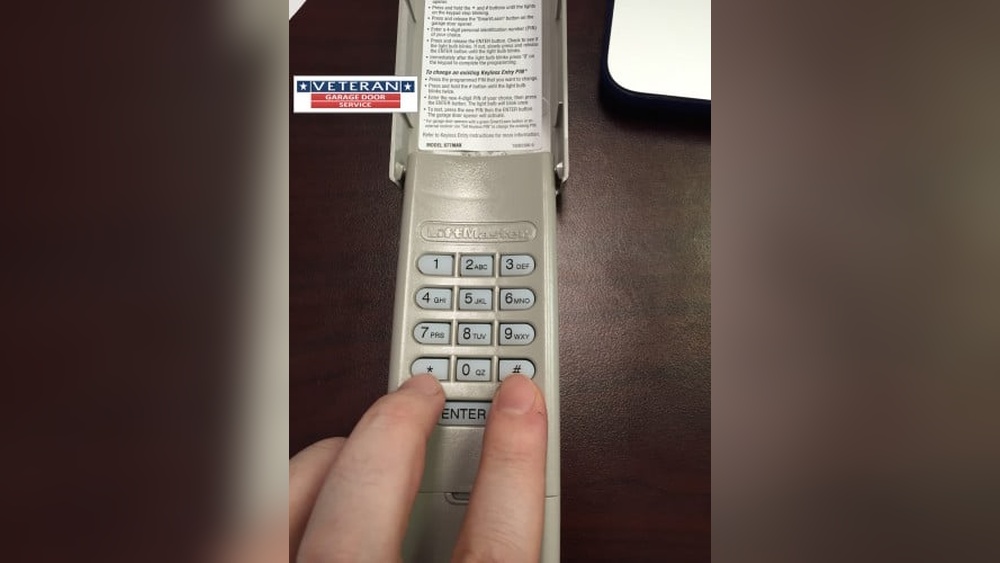
- On your keypad, press and hold the “ button (or “Enter” on some models) for 2-3 seconds.
- The keypad should light up.
3. Set Your New Code
- Enter a 4-digit code of your choice.
- Press and hold the Enter button.
- At the opener unit, quickly press and release the Learn button (within 30 seconds of entering the code).
- Wait for the light on the opener to blink. This means the code is accepted.
4. Test The Keypad
- Close your garage door.
- Enter your new 4-digit code on the keypad.
- Press Enter. The door should open or close.
Practical Example:
If your new code is 1234:
- On the keypad: Press 1-2-3-4, then Enter.
- At the motor: Press the Learn button.
- The door should work with the new code.
5. Finish And Secure
- Place the keypad cover back if you removed it.
- Try the code a few times to be sure it works.
- Give the code only to trusted people.
What If You Forgot Your Old Code?
If you do not remember your old code, you can still reprogram. The Learn button erases all previous codes. Just follow the steps above to add a new code.
Troubleshooting: Common Problems And Solutions
Keypads can sometimes be tricky. Here are common issues and how to fix them:
Keypad Not Responding
- Check the battery. Most Liftmaster keypads use a 9V battery.
- Make sure the keypad is clean and dry.
- Look for stuck keys or dirt.
Code Won’t Program
- Make sure you press the Learn button within 30 seconds after entering the code.
- Check if the Learn button color matches the instructions.
- Try changing the code to something simpler (avoid repeated digits like 1111).
Door Opens On Its Own
- Someone else may know your code. Reprogram it with a new code.
- Check for stuck keys on the keypad.
Keypad Works Only Sometimes
- Weak battery—replace it.
- Distance from the opener may be too far. Move closer.
- Interference from metal objects or wireless devices.
Tips For Choosing A Secure Code
Your code should be easy to remember but hard for strangers to guess. Follow these tips:
- Avoid obvious codes like 1234 or your address.
- Do not use repeated digits (e.g., 0000).
- Change your code every 6–12 months for better security.
- Share your code only with people you trust.
How To Add Multiple Codes
Some Liftmaster models allow you to add temporary PINs for guests or workers.
- Enter your main code, then press and hold or #.
- Enter the temporary code.
- Press Enter. The light will blink to confirm.
Temporary codes can usually be set to expire after a certain time or number of uses.
When To Replace Your Keypad
Keypads can last for years, but sometimes replacement is the best solution. Signs you might need a new one:
- Keypad is cracked or damaged.
- Buttons do not work even after replacing the battery.
- The light does not turn on.
- Water damage.
A new Liftmaster keypad usually costs $30–$50 and is easy to install.
Comparing Keypad Features
Not all keypads are the same. Here is a quick comparison of features you may find:
| Model | Backlit Keys | Weatherproof | Temporary PINs | Battery Type |
|---|---|---|---|---|
| 877MAX | Yes | Yes | Yes | 9V |
| 878MAX | Yes | Yes | No | 9V |
| 387LM | No | Yes | No | 9V |
Choose a keypad with features that fit your needs.
Real-life Example: Fast Reprogramming
Jane just moved to a new house. She did not know the old garage code. She followed these steps:
- Located the Learn button (hers was yellow).
- Held it for 6 seconds to clear old codes.
- Set her new code (5723).
- Programmed the keypad in less than 5 minutes.
Now, only Jane knows the code. Her garage is secure, and she does not worry about strangers.
Key Mistakes To Avoid
- Using easy codes: Avoid simple or repeated codes.
- Forgetting to erase old codes: Always clear old codes when you move in or lose a remote.
- Not checking the battery: A weak battery can make the keypad unreliable.
- Skipping the test: Always test your code before closing the garage.
Maintenance And Care
Keep your keypad working well by following these tips:
- Change the battery once a year.
- Clean the buttons with a dry cloth.
- Check for cracks or water damage.
- Cover the keypad during heavy rain.
Security Best Practices
More than half of break-ins happen because of weak entry codes. Here’s how to stay safe:
- Change your code if you share it with someone, then they move out.
- Do not write your code on the keypad or nearby.
- Use a code that is not related to birthdays or addresses.
If you want more advanced security, consider keypads with rolling codes or smart technology.
How To Reset Without The Learn Button
Some older models do not have a Learn button. Instead, you must:
- Remove the keypad from the wall.
- Disconnect the battery for 10 seconds.
- Reconnect and set a new code.
This method only works for certain models. Check your user manual or the Liftmaster website for details.

Credit: www.youtube.com
Costs: Keypad Vs. Remote
People often ask if a keypad is better than a remote. Here’s a quick look:
| Device | Price Range | Security | Convenience |
|---|---|---|---|
| Keypad | $30–$50 | High (if code is unique) | Very convenient |
| Remote | $20–$40 | Medium | Easy to lose |
A keypad is often safer because you do not need to carry anything.
Where To Find More Help
If you are still having trouble, check the Liftmaster website or your keypad’s manual. Many video guides are also available online. For tricky problems, contact a local garage door expert.
For official instructions and more details, visit the Liftmaster Support Center.
Credit: www.reddit.com
Frequently Asked Questions
How Often Should I Change My Liftmaster Keypad Code?
It is smart to change your code every 6–12 months. Change it right away if you think someone else knows it.
What Battery Does A Liftmaster Keypad Use?
Most Liftmaster keypads use a 9V battery. Some older models may use different types, so check your manual.
Can I Have More Than One Code For Different People?
Yes. Some keypads allow temporary PINs for guests or workers. These can expire after a set time or use.
What Should I Do If The Keypad Stops Working After Reprogramming?
First, replace the battery. Then, check that you followed the programming steps. If it still does not work, try resetting the keypad and reprogramming it.
Is It Safe To Use A Wireless Keypad For My Garage?
Yes, wireless keypads are safe if you use a unique code and change it regularly. Modern keypads use secure technology to keep your garage protected.
Reprogramming your Liftmaster keypad is simple and makes your garage more secure. With the right steps, anyone—even beginners—can do it in minutes. Keep your code private and change it often for the best protection. Your garage, and your peace of mind, are worth it.