If you use your detached garage as a workshop, gym, or office, you know that a strong WiFi signal is essential. But garages are often far from the house and separated by thick walls or even a yard. Many people find their internet stops working once they step outside or close the garage door. The good news is, you do not have to move your router or drill new holes in the wall. There are several ways to extend WiFi to a detached garage, and with the right approach, you can enjoy fast, reliable internet in your workspace.
This guide will show you step-by-step how to get WiFi from your house to your detached garage. You will learn about the best solutions, when to use each one, common mistakes to avoid, and how to compare products. Even if you’re not a tech expert, you can solve this problem with a little planning.
Understanding The Challenge
The main problem is distance and obstacles. Most home routers are designed to cover one house, not a separate building. WiFi signals get weaker with every wall, window, or tree. Outdoor weather and metal garage doors can block signals even more.
Here’s why WiFi struggles to reach your garage:
- Signal strength drops fast with distance
- Thick walls, especially concrete or brick, block signals
- Metal doors or cars reflect and absorb signals
- Interference from other devices can make things worse
Before spending money, test your current signal. Stand in your garage with your phone or laptop and check the WiFi bars. Use a free app like WiFi Analyzer to measure the signal in different spots. If you see weak or no signal, it’s time for an upgrade.
Solution 1: Wifi Range Extenders
One easy way to boost your signal is with a WiFi range extender (sometimes called a repeater).
How it works:
- The extender connects wirelessly to your main router.
- It creates a new network in the garage, repeating the signal.
- Devices in the garage connect to the extender, not directly to your router.
Benefits:
- Simple setup—just plug it in.
- No need for cables or drilling.
- Affordable (prices range from $30–$100).
Limitations:
- Slower speeds than connecting directly to the router.
- Extender must be close enough to the house to pick up a strong signal.
Placement tips:
- Place the extender halfway between the house and the garage.
- Avoid putting it in a basement or next to thick walls.
Example:
If your garage is 40 feet from the house and the signal is weak at the door, place the extender near a window facing the garage.
Solution 2: Mesh Wifi Systems
Mesh WiFi is a modern way to cover your whole property with strong internet.
How it works:
- Mesh systems use several units, called nodes.
- The main node connects to your router, and extra nodes go in the garage.
- All nodes share one network name.
Benefits:
- Seamless coverage—your device switches automatically to the strongest node.
- Fast speeds, even at the edge of your property.
- Easy to expand later.
Drawbacks:
- More expensive than extenders ($150–$400 for a starter kit).
- Some systems need power and might not work outdoors.
Placement tips:
- Put one node in the house near the garage, and another inside the garage.
- Choose weather-resistant models for outdoor use.
Non-obvious tip:
Some mesh systems, like Eero or Orbi, let you add outdoor nodes designed for rain and sun. This is ideal if your garage is far from the house.
Solution 3: Outdoor Point-to-point Wireless Bridges
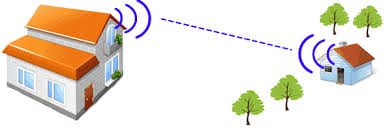
For long distances (over 100 feet) or when walls block all signals, a wireless bridge is often the best choice.
How it works:
- Two devices (transmitter and receiver) create a direct wireless link.
- One goes outside your house; the other mounts outside the garage.
- The garage receiver connects to a WiFi router or access point inside.
Benefits:
- Fast and reliable, even for streaming or security cameras.
- Works up to 1,000 feet or more with a clear line of sight.
- Not affected by walls or doors.
Downsides:
- More complex setup—may need a ladder and some basic networking knowledge.
- Requires mounting hardware and outdoor power.
Example:
A TP-Link CPE210 bridge can link your house and garage up to 600 feet apart. For garages blocked by trees or houses, look for higher-power models.
Important data:
Wireless bridges can deliver speeds of 300–900 Mbps—enough for video streaming and work.
Credit: medium.com
Solution 4: Ethernet Cable With Access Point
If you want the most stable connection, running an Ethernet cable is still the gold standard.
How it works:
- Run a weatherproof Cat6 cable from your house router to the garage.
- Connect a WiFi access point or second router in the garage.
- You get full-speed WiFi in the garage, unaffected by walls.
Pros:
- Best speed and reliability—no wireless interference.
- Simple once installed, works with any internet plan.
Cons:
- Requires digging or running cable overhead.
- May need help from an electrician for long distances.
Practical tip:
Use direct-burial Ethernet cable if you bury it underground. This protects the wire from water and animals.
Cost:
A 100-foot Cat6 cable costs about $30–$60. Add $50–$100 for a good access point.
Comparing The Main Solutions
To help you choose, here’s a quick comparison:
| Solution | Range | Speed | Difficulty | Cost |
|---|---|---|---|---|
| WiFi Extender | Up to 100 ft | Medium | Easy | $30-$100 |
| Mesh System | Up to 300 ft | High | Easy | $150-$400 |
| Wireless Bridge | 600–1000+ ft | Very High | Medium | $60-$200 |
| Ethernet Cable | Up to 330 ft | Maximum | Hard | $80-$200 |
Factors To Consider Before Choosing
1. Distance
- Under 100 ft, extenders or mesh systems usually work.
- Over 100 ft, use mesh or a wireless bridge.
- Over 300 ft or with many obstacles, Ethernet or a high-power bridge is best.
2. Speed Needs
- For video calls or streaming, aim for at least 50 Mbps.
- For work or large file transfers, more is better.
3. Power Availability
- All solutions need power in the garage.
- If there’s no outlet, consider solar power or battery for outdoor equipment.
4. Weather And Outdoor Setup
- Use weatherproof devices outside.
- Protect cables with conduit underground or along fences.
5. Budget
- Extenders are cheapest, but may not solve severe problems.
- Mesh and bridges cost more but are future-proof.
Step-by-step: Installing A Wireless Bridge
For many garages, a point-to-point bridge is the best mix of speed and ease.
1. Buy A Wireless Bridge Kit:
Popular brands: TP-Link, Ubiquiti NanoStation.
2. Mount The Transmitter Outside Your House:
Choose a spot facing the garage, clear of trees or walls.
3. Mount The Receiver Outside The Garage:
Line it up with the transmitter for a straight path.
- Connect the transmitter to your router with Ethernet.
- Connect the receiver to a WiFi access point inside the garage.
- Power both units:
Most use Power over Ethernet (PoE) adapters.
7. Test The Connection:
Check speed and reliability with your phone or laptop.
Pro tip:
If you must run cable through a window or wall, use a small drill bit and seal the hole with weatherproof caulk.
Credit: ontrackgaragedoorservice.com
Common Mistakes To Avoid
- Placing extenders behind thick walls—they need a strong source signal.
- Mixing old and new technology—a modern mesh node won’t help if your main router is very old.
- Ignoring power needs—outdoor bridges and nodes need outlets or PoE.
- Not testing before final installation—try different spots before fixing devices permanently.
- Using cheap, non-weatherproof devices outdoors—they will fail in rain or snow.
Real-world Example
John wanted fast internet in his garage 120 feet from his house, separated by a yard and a tree. He tried a WiFi extender, but the signal was weak. He switched to a TP-Link wireless bridge and installed an outdoor access point in the garage.
Now he streams 4K video, runs smart lights, and even holds Zoom meetings—all with no lag.

Credit: www.radiolabs.com
Advanced Tips For Best Results
- Upgrade your main router to a WiFi 6 model for better range and speed.
- Use a WiFi analyzer app to find the best channel and avoid interference.
- If you have many smart devices, use a mesh system for easy expansion.
- For very long runs, consider fiber optic cable—it’s immune to electrical interference, but costs more.
Example: Mesh Vs. Bridge Performance
Here’s a look at how speeds can compare in a real test:
| Solution | Distance (ft) | Speed Indoors (Mbps) | Speed in Garage (Mbps) |
|---|---|---|---|
| Mesh Node | 100 | 300 | 140 |
| Wireless Bridge | 120 | 300 | 265 |
| WiFi Extender | 80 | 200 | 70 |
This shows that bridges often deliver faster speeds at longer distances, but mesh can be a simple solution if the garage is not too far.
When To Hire A Professional
If your garage is very far, or you have special needs (like security cameras or smart home gear), a network installer can help:
- They test for the best spots and run cables safely.
- They can set up outdoor access points and hide cables.
- Costs range from $200–$500, depending on distance and materials.
For most homes, though, you can do it yourself with a bit of research and patience.
External Resource
To learn more about WiFi technology and best practices, visit the Wi-Fi Wikipedia page.
Frequently Asked Questions
How Far Can Wifi Reach Outdoors?
WiFi can reach up to 300 feet outdoors with a clear line of sight. Walls, trees, and buildings can reduce this to 100 feet or less. Outdoor wireless bridges can extend WiFi up to 1,000 feet or more.
What Is The Best Way To Get Wifi To A Detached Garage?
For most people, a wireless bridge or mesh system works best. If you need maximum speed or reliability, running an Ethernet cable with an access point is ideal. WiFi extenders are good for short distances.
Do I Need A Special Router For The Garage?
You do not need a special router, but a WiFi 6 router can help with range and speed. For the garage, use a good access point or mesh node. Outdoor devices should be weatherproof.
Will Security Cameras In My Garage Work With These Solutions?
Yes. All the solutions above can support WiFi security cameras. For best results with high-resolution cameras, use a wireless bridge or Ethernet cable to ensure strong, stable internet.
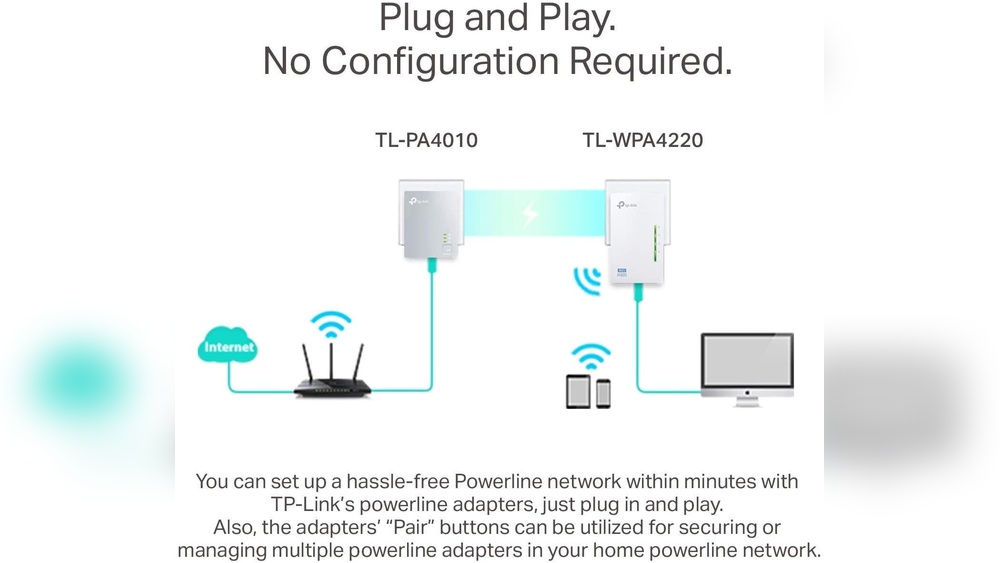
Can I Use Powerline Adapters For My Garage?
Powerline adapters sometimes work if your garage and house share the same electrical panel. However, they often do not work across separate buildings or old wiring. Test before relying on this method.
With the right plan, you can enjoy fast WiFi in your detached garage—no matter how far it is from your house. Choose the solution that fits your distance, budget, and speed needs, and take the time to test before final installation. Your garage can be just as connected as your living room.